
Google Pixel 10 Battery Capacity Reduction: Causes & Fixes
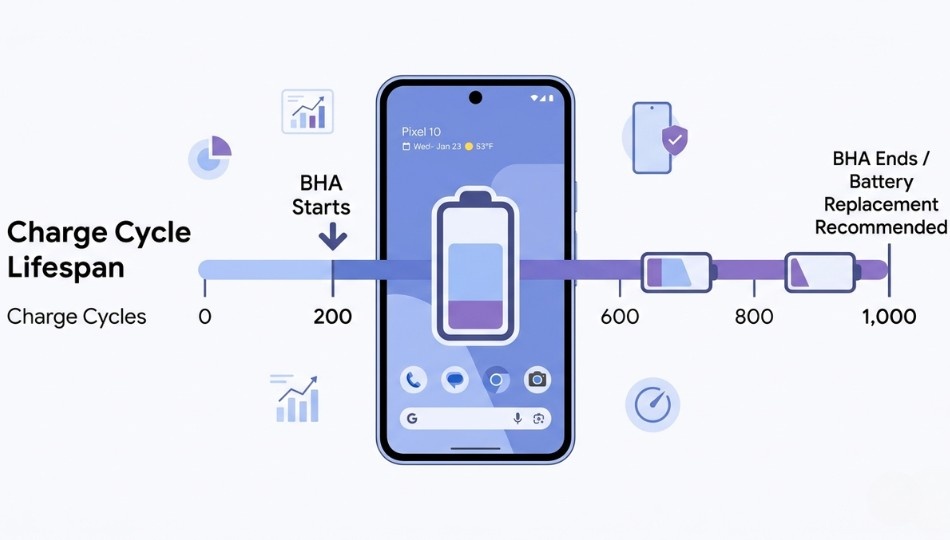
If you own a Google Pixel 10, you might have noticed its battery doesn’t last as long as it used to. This isn’t just normal wear and tear. Google has implemented a feature in the Pixel 10 called Battery Health Assistance (BHA), which actively reduces your battery’s voltage after about 200 charge cycles. For someone charging daily, that happens in under seven months. Unlike Apple’s opt-in battery management, Google’s system is mandatory and cannot be turned off.
This article breaks down what causes Pixel 10 battery capacity reduction, how BHA works, and practical ways to slow down the decline. You’ll also learn when a battery replacement is worth considering and how this issue compares to other flagship phones.
Quick Overview: What Causes Pixel 10 Battery Capacity Reduction?
The Pixel 10 battery capacity reduction is software-driven. BHA lowers the battery’s maximum voltage in stages, starting at 200 charge cycles and continuing up to 1,000 cycles. The effect is twofold: your phone’s runtime gradually shortens and charging speeds slow down. Google’s documentation notes that Pixel 8a and newer devices are designed to retain around 80% battery capacity at 1,000 cycles.
The key difference from Apple devices is that Apple’s Battery Health feature is optional and transparent, whereas Google enforces BHA automatically. Coupled with natural lithium-ion degradation, the real-world capacity drop happens faster than many users expect.
According to Google’s official Pixel battery support page, Pixel 8a and later devices are designed to retain around 80% battery capacity at 1,000 cycles.
Why Pixel 10 Battery Capacity Reduction Matters
Not all battery aging is created equal. With the Pixel 10, the reduction is accelerated on purpose. This firmware-level intervention prevents certain battery failures, but it also limits user control.
Google confirmed via Android Authority that BHA adjusts battery voltage gradually from 200 to 1,000 cycles. That means a daily charger will encounter throttling in less than seven months. Charging twice a day can trigger the first adjustment in just three to four months.
Past models like the Pixel 6a faced documented battery swelling and overheating. Mandatory updates on the Pixel 4a, 6a, and 7a reduced performance to prevent safety hazards. BHA is Google’s way of preventing similar issues with the Pixel 10. While safety is the goal, users lose the choice to disable this feature.
Google confirmed via Android Authority. That Battery Health Assistance adjucts battery voltage gradually from 200 to 1,000 cycles.
Expert Mishaal Rahman of Android Authority notes:
“BHA is a shift in how Google balances long-term battery safety with user experience. The feature itself isn’t harmful, but removing the toggle is what triggers backlash.”
How Battery Health Assistance Works
BHA reduces voltage gradually rather than suddenly. Here’s the lifecycle:
- 0 cycles: Full battery voltage and capacity.
- 200 cycles: First stage of voltage reduction begins.
- 200–1,000 cycles: Voltage decreases in increments.
- 1,000+ cycles: BHA stops, but natural lithium-ion wear continues.
You cannot turn off BHA, but you can slow cycle accumulation to delay its impact. The method below, called PACE, is designed to extend battery longevity.
The PACE Method: Slow Pixel 10 Battery Capacity Reduction
P: Partial Charging
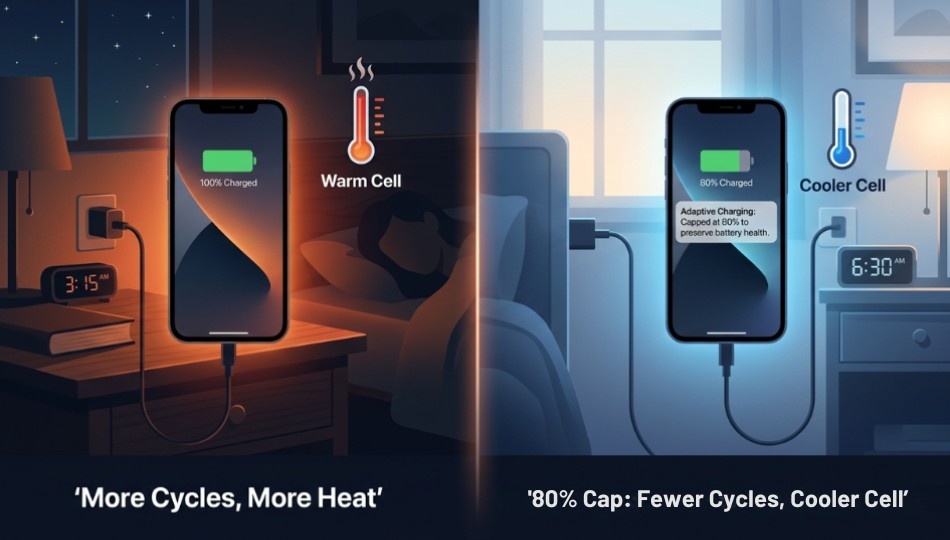
A full charge cycle is cumulative. Charging from 50% to 100% counts as 0.5 cycles. Keeping your battery between 20% and 80% significantly reduces cycles. If you want more proven strategies, check out this detailed on improving smartphone battery performance. Use Settings > Battery > Adaptive Charging to let your phone charge slowly overnight. Tests show this can drop daily cycles from 1.0 to 0.62, extending time before the first BHA adjustment.
A: Avoid Extreme Temperatures
Heat accelerates lithium-ion degradation. Battery University reports that charging at 40°C (104°F) degrades cells about four times faster than at 25°C (77°F). Apps running in the background can heat your device. Monitor Settings > Battery > Battery Usage to restrict energy-hogging apps.
C: Cap Maximum Charge
Set the Charging Limit in Settings > Battery to 80%. While you lose 20% of peak capacity, this reduces stress on cells and slows degradation. Users report reaching 200 cycles in 11 months instead of 7 with this approach.
E: Enable Battery Saver Strategically
Use Extreme Battery Saver during long meetings or travel. This prevents small background drain cycles. Avoid leaving it on permanently, as it can limit essential notifications and app performance.
How to Check Your Pixel 10 Cycle Count
Many guides skip this step, but it’s crucial.
- Open Settings.
- Tap About phone.
- Tap Battery information.
You will see your charge cycle count, manufacture date, and first-use date. This feature is available for Pixel 8a and later. As of March 2026, no reliable third-party apps provide accurate cycle data.
Pixel 10 vs Competitors: Battery Degradation
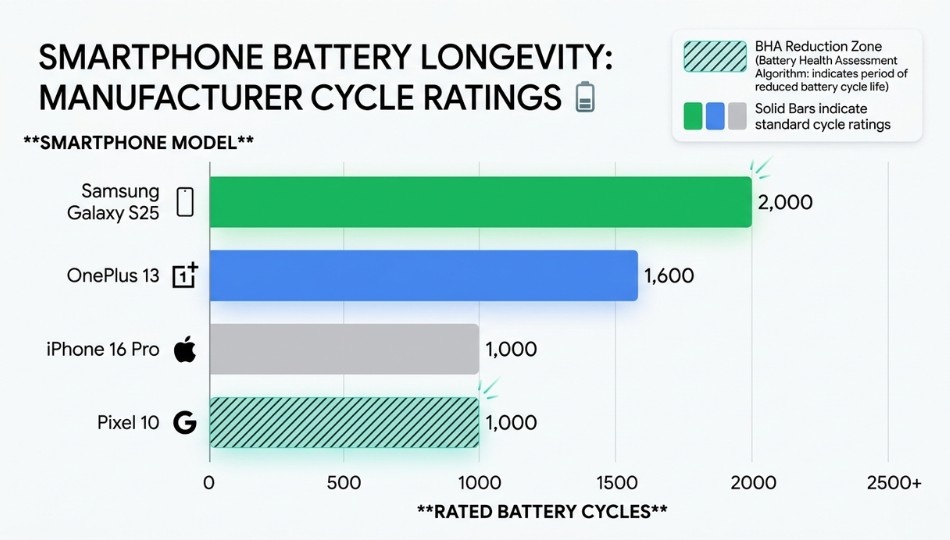
A common misconception is that all phone batteries degrade equally. Pixel 10’s reduction is unique: it combines lower cycle ratings with mandatory voltage reduction.
| Factor | Pixel 10 | Samsung Galaxy S25 | OnePlus / OPPO | Notes |
|---|---|---|---|---|
| BHA Trigger | 200 cycles (~7 months) | N/A | Optional | Pixel 10 reduces voltage automatically |
| BHA End | 1,000 cycles | N/A | Optional | Gradual adjustments until 1,000 cycles |
| Cycle Rating | 80% at 1,000 cycles | 80% at 2,000 cycles | 80% at 1,600 cycles | Pixel 10 lags in cycle longevity |
| Natural Degradation | 2–3% per 100 cycles | Same | Same | Adds on top of BHA |
| User Control | No toggle | Yes | Yes | Only Pixel 10 removes choice |
Natural degradation plus BHA reduces capacity faster than competitors. For example, at 500 cycles, a Pixel 10 may be 88–92% of original capacity, while a Samsung Galaxy S25 remains 94–96%.
Shallow charging, Adaptive Charging, and the 80% limit are most effective for users keeping the phone 3+ years. If you upgrade annually, capacity reduction will have minimal impact.
Interestingly, the Pixel 10 battery is larger than the Pixel 9’s: 4,970mAh versus 4,700mAh on standard models, and 5,200mAh for Pro XL. Google added headroom because BHA reduces usable capacity over time.
When BHA Benefits You
BHA isn’t purely negative. Gradual voltage reduction has benefits:
- Thermal stability: Less heat during charging, safer in warm environments.
- Consistent performance: Avoids sudden battery crashes after 18 months.
- Longer device lifespan: Aims for 80% capacity at 1,000 cycles, roughly 2.7 years of daily use.
BHA works best for moderate users who charge predictably and mainly use messaging, browsing, and streaming. Heavy users or those in hot climates may still need power banks to compensate.
5 Mistakes Accelerating Pixel 10 Battery Health Dropping
- Charging to 100% every night: Extreme states stress cells. Use Adaptive Charging to automate overnight charging. For a complete breakdown of daily habits that extend battery life, see this on improving phone battery life.
- Ignoring background apps draining battery Android: Background processes increase heat and cycle count. Restrict high-consumption apps.
- Treating overheating as separate from battery drain: Heat accelerates both natural and BHA-induced degradation. Monitor device temperature.
- Using fast chargers constantly: Max-watt charging generates heat. Reserve fast charging for urgent needs.
- Delaying battery replacement: Google and third-party options exist. Replace around 75% capacity or after 1,000 cycles for sustained performance.
3 Key Takeaways
- Check your cycle count now to implement PACE early.
- Enable Adaptive Charging and set an 80% charge cap. These are the most effective battery optimization settings.
- Plan for a replacement around year three. It restores capacity affordably without buying a new phone.
Frequently Asked Questions
No. BHA is mandatory. Slowing cycle accumulation with smart charging habits is the only option.
Expect roughly 90–93% at 300 cycles, 85–88% at 600 cycles, and 80% near 1,000 cycles, depending on temperature and charging habits.
Yes. Limiting max charge reduces peak voltage stress and slows degradation significantly when combined with Adaptive Charging.
One daily charge reaches 200 cycles in 6.5–7 months. Two full charges daily can reach 200 cycles in under 4 months.
BHA stops adjusting. Natural degradation continues. Google recommends a battery replacement at this point.
Both aim for 80% capacity at 1,000 cycles. Apple’s approach is optional and transparent. Pixel 10 is mandatory with no user-visible percentage.
No. BHA is intentional software behavior. Warranty covers defects, not designed voltage reductions.
Settings > About phone > Battery information. Cycle count, manufacture date, and first-use date appear there.