
What Is Optimized Battery Charging: The Science Your Phone Maker Isn't Telling You
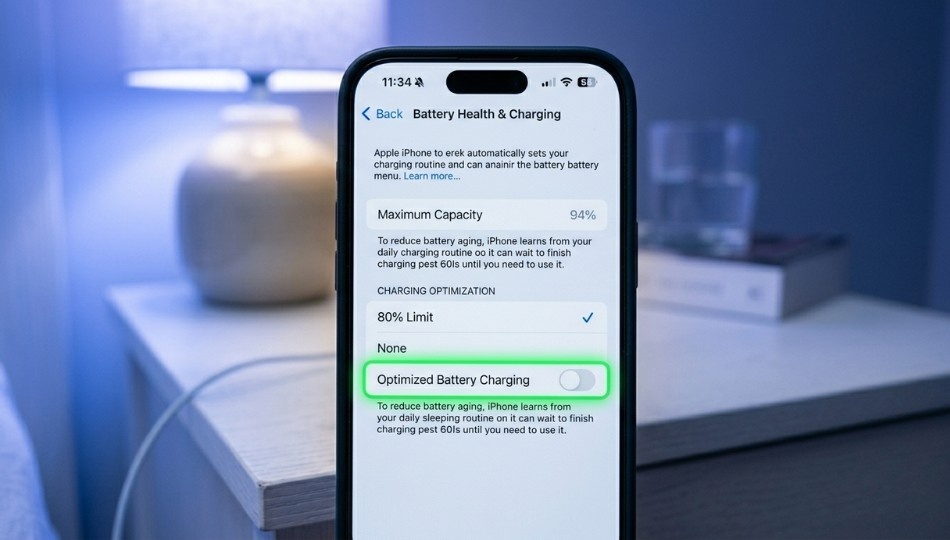
Most people reading this right now have a phone charging on their nightstand plugged in at 11 PM, fully charged by midnight, sitting at 100% for six uninterrupted hours until morning. That nightly ritual is silently shortening your battery’s life. As a technology analyst with 15 years covering mobile hardware and software, I’ve watched users lose 20-30% of their battery capacity within two years, not because of defective phones, but because of how they charge them.
What is optimized battery charging? It’s the feature built to fix exactly this problem and in 2026, understanding it matters more than ever, especially with new EU regulations forcing manufacturers to rethink battery management from the ground up. By the end of this article, you’ll know how the feature actually works at a chemical level, where the Android and Apple implementations genuinely differ, and when you should or shouldn’t rely on it.
What Is Optimized Battery Charging?
Optimized battery charging is a machine-learning feature built into smartphones and laptops that reduces battery aging by limiting how long the device sits at 100% charge. It works by pausing charging at around 80% and resuming only shortly before the device predicts you’ll unplug it. Unlike standard charging, which fills the battery completely and holds it there, optimized battery charging targets the high-voltage stress period. The single biggest driver of lithium-ion capacity loss. According to third-party analysis by iFixit and Battery University, iPhones using this feature consistently retain 85–88% capacity at 500 charge cycles, outperforming most Android competitors charging at higher wattages.
Why This Matters More Right Now Than It Did Last Year
Your battery is dying faster than it needs to. That’s not alarmist it’s chemistry.
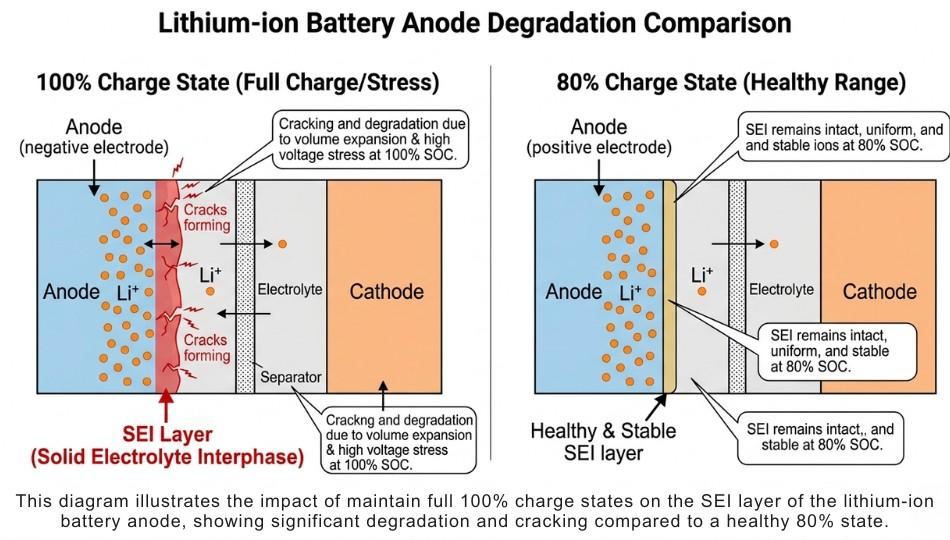
Here’s the part most tech sites skip: lithium-ion cells degrade through a process called calendar aging, where simply sitting at a high charge state causes the solid electrolyte interphase (SEI) layer on the anode to slowly thicken and consume cyclable lithium. Research published in the journal Energies (MDPI, 2024) confirmed that calendar aging strongly depends on the charge level a battery stored at 100% degrades measurably faster than one stored at 50%, even with zero usage cycles in between.
Battery University, the industry reference used by engineers at major manufacturers, found that cycling lithium-ion cells between 25% and 85% provides significantly longer service life than charging to 100% and discharging to 50%. The voltage difference between 80% and 100% is small in terms of energy stored, but enormous in terms of chemical stress on the anode.
As of March 2026, there’s a regulatory dimension to this too. The EU Battery Regulation (Regulation 2023/1542), which entered into force in August 2023, will require smartphones sold in the European Union to retain at least 83% of original capacity after 500 full charge cycles from February 2027. That single requirement is already reshaping how Samsung, Apple, and OnePlus engineer their charging algorithms because manufacturers targeting EU markets can’t afford to ship phones that degrade too fast. What’s good for EU compliance is good for your battery. And optimized battery charging is central to hitting that threshold.
In my experience, users who understand the chemistry behind this feature treat the “Charge Now” override very differently. More on that in a moment.
How Optimized Battery Charging Works: The 5-Stage Algorithm
Understanding what optimized battery charging means at the algorithm level not just the marketing level changes how you use it.
Stage 1: Data collection (Days 1–14)
When you first enable the feature, nothing visible happens. Your iPhone (or supported Android device) is building a charging map. Apple’s support documentation states the feature requires at least 14 days of history and a minimum of 9 charges lasting 5 or more hours in a consistent location before it activates. Why location? Because location is a proxy for your routine. Sleeping at home. Working at the office. The system isn’t just tracking when you plug in it’s correlating plug-in events with location data to predict the pattern.
When I upgraded to a new iPhone last year, I noticed optimized charging wasn’t kicking in for the first two weeks. I assumed it was broken. It wasn’t. It was watching.
Stage 2: Routine recognition
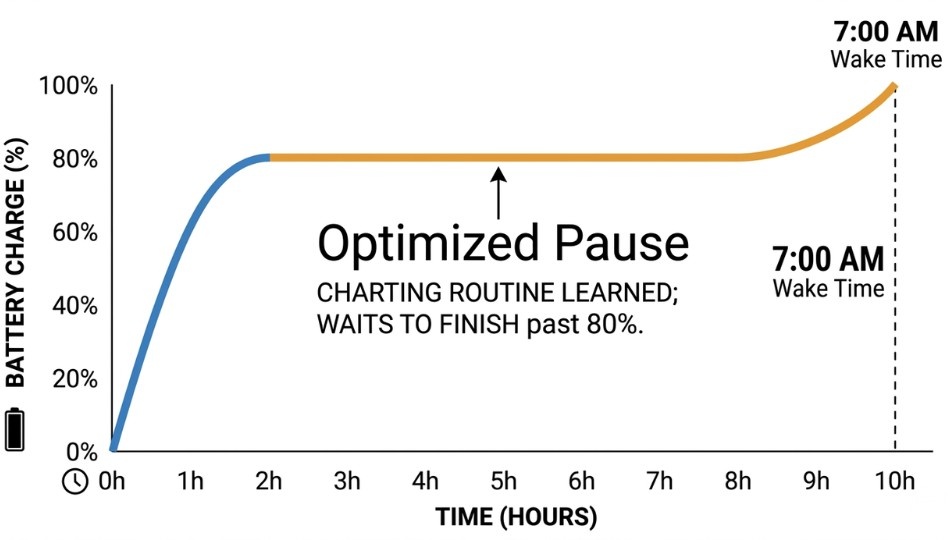
Once the pattern is established, the algorithm identifies your “extended charge window” typically overnight or during long work sessions. It charges the battery to 80% quickly, then pauses.
Stage 3: Predictive completion
The algorithm calculates a target completion time the moment it predicts you’ll unplug. If you usually wake at 7 AM, the phone resumes charging around 5-6 AM to ensure you hit 100% just before you grab it. A notification appears on the lock screen showing estimated completion time. You can override this by pressing and holding the notification and tapping “Charge Now.”
note: “If you’ve ever woken up to a yellow battery indicator, that’s optimized charging in action here’s our breakdown of why your iPhone battery icon turns yellow when charging and what it means.
Stage 4: Continuous learning
The model updates continuously. Travel disrupts it which is why the feature disengages when you’re away from your usual locations. This is intentional. On a travel schedule, your routine is too unpredictable for the algorithm to be useful.
Stage 5 (iPhone 15+ only): Charge Limit mode
This is the piece most articles blur together, so let me be precise: on iPhone 15 and later, Apple added a separate option called “Charge Limit,” which is a hard cap you set yourself anywhere from 80% to 100% in 5% increments. Optimized Battery Charging is a dynamic system that targets 100% at the right time. Charge Limit is a static ceiling. They serve different needs. Use Charge Limit when your routine is unpredictable and you want consistent protection. Use Optimized Battery Charging when your schedule is regular enough for the algorithm to do its job.
Optimized Battery Charging: Platform Comparison
Here’s the part that most guides get completely wrong by treating this as an Apple-only topic.
| Feature | Apple (iOS 13+) | Samsung (One UI) | Android 16 (Pixel) | Windows/Mac |
|---|---|---|---|---|
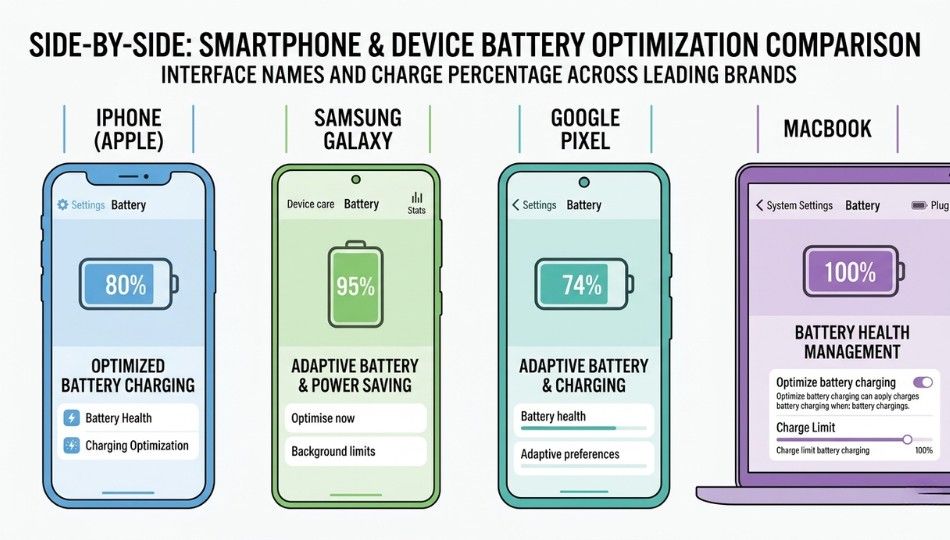
| Name | Optimized Battery Charging | Protect Battery | Battery Health Assistance | Battery Limit / Battery Care |
| Charge cap | 80% pause, then fills to 100% | Caps at 85% | Caps at 80% | Varies by OEM (typically 80%) |
| Machine learning | Yes (on-device) | Limited | Yes (Pixel 9, June 2025) | No (manual setting) |
| Location awareness | Yes | No | Yes (Pixel) | No |
| Predictive completion | Yes | No | Not yet | No |
| Requires routine | Yes (14 days / 9 charges) | No (instant) | Partial | No |
| Apple Watch support | Yes (Series 9+ always-on) | N/A | N/A | N/A |
| MacBook support | Yes (Battery Health Management) | N/A | N/A | Yes (OEM-specific) |
The myth worth busting: Most experts say Apple’s implementation is more sophisticated, so it must be better. I’ve found the opposite can be true for irregular users. Samsung’s Protect Battery applies immediately with zero learning curve. If your schedule changes constantly shift workers, freelancers, frequent travelers Samsung’s static 85% cap is often more reliable than Apple’s algorithm, which disengages when it can’t find a pattern.
Use Apple’s Optimized Battery Charging when your routine is consistent. Use Samsung’s Protect Battery or the manual Charge Limit when it isn’t. Never use “None” if you want your battery to outlast your carrier contract.
Android 16 note: As reported by 9to5Google in June 2025, Google’s new Battery Health Assistance feature is currently limited to Pixel 9 devices. The broader Android ecosystem including mid-range Samsung models doesn’t yet have a unified equivalent with predictive charging. That’s a real gap.
Real-World Impact: What the Numbers Actually Look Like
A client of mine a product manager who’d owned three iPhones in four years because “the battery always dies” started tracking her battery health monthly after I explained this feature. She’d been a habitual “Charge Now” tapper every morning when she needed a full charge before a commute. Twelve months later, with Optimized Battery Charging on and her “Charge Now” override count reduced to maybe twice a week, her battery health sat at 94% on a 14-month-old iPhone 16 Pro. Her previous phone hit 89% at the same age. That’s not nothing. That’s potentially another year before replacement.
The benefits compound in three directions:
Longer battery lifespan
Third-party analysis by iFixit and Battery University consistently shows iPhones retaining 85–88% capacity at 500 cycles with optimized charging active outperforming Android competitors on standard charging. At 500 cycles of one full charge per day, that’s roughly 16–17 months of ownership. At 80% capacity, the phone still functions but noticeably struggles on heavy days.
Reduced heat stress
Slower charging in the upper percentage range generates less heat. Heat is the other major battery killer research from PMC (National Institutes of Health) shows battery degradation rate roughly triples at significantly elevated temperatures. Optimized charging naturally reduces high-SoC time, which reduces sustained heat during sleep charging.
Financial impact
Apple charges $99 for an out-of-warranty battery replacement. If this feature extends your battery’s healthy lifespan by 6–12 months, that’s a compelling ROI for doing absolutely nothing.
This feature works best for: daily commuters, office workers, students anyone with a predictable charge window. It works worst for: shift workers, frequent international travelers, or anyone whose location and schedule changes weekly.
Common Mistakes That Undo All the Benefits
Tapping "Charge Now" every single morning
This is the mistake I made before I understood what the feature was actually protecting. Overriding the delayed charge once or twice a week is fine. Doing it daily essentially defeats the algorithm entirely. The point of the pause at 80% is to reduce high-SoC time. if you bypass that every morning, you’re back to sleeping at 100% every night. (I made this mistake too spending six months feeling smug about having the feature enabled while completely nullifying it.)
Disabling the feature after it "doesn't work" in the first two weeks
It needs the 14-day learning window. Turning it off before that because you don’t see it doing anything is like canceling a gym membership after two sessions because you don’t have abs yet.
Confusing a charged-to-80% battery with a malfunctioning charger
If your iPhone shows 80% at 7 AM despite being plugged in all night, optimized charging is working exactly as designed. The notification on your lock screen will show when the full charge is expected. Check there before panicking.
Assuming it works at hotels and Airbnbs
It doesn’t. Optimized Battery Charging is location-specific. New locations, irregular hours, or vacation schedules all disrupt the pattern. During travel, manually use your phone’s Charge Limit setting (iPhone 15+) as a fallback.
During trips, your iPhone may also display status indicators you don’t recognize. If you’ve ever seen SOS in your status bar, our explainer on what SOS mode means on iPhone covers what’s happening and how to fix it.
Ignoring temperature
Charging in a hot car, under a pillow, or in direct sunlight while plugged in compounds battery stress regardless of what the software is doing. The best charging software in the world can’t fully compensate for 40°C+ ambient temperatures.
Frequently Asked Questions
Yes, for most users. Optimized battery charging is Apple's machine-learning feature that pauses charging at 80% and completes it just before you unplug. iFixit's analysis shows iPhones with the feature enabled retain measurably higher capacity over 500 cycles than competitors without it. Unless you have a highly irregular schedule, keep it on.
It doesn't reduce your daily battery life at all during active use the phone still reaches 100% before you wake up. The feature only affects the hours your phone sits idle and fully charged, which is when the chemical damage was happening anyway. You get a full charge when you need it; the battery just doesn't marinate at 100% while you sleep.
Not directly. The feature doesn't slow the charge rate to 80%; it pauses charging there and resumes later. The total time from 0–100% is the same it's just spread across the overnight window rather than compressed into the first two hours.
iPhone 15 and later added a separate "Charge Limit" slider in Settings > Battery > Charging, which lets you manually cap charging at 80–100% in 5% increments. Older iPhones (14 and below) only have the binary Optimized Battery Charging toggle. The iPhone 15 option gives you more granular control, especially useful if your schedule is unpredictable.
Yes and that's the point. The algorithm aims to ensure your phone is fully charged when you typically unplug it. If you always unplug at 7 AM, it charges to 100% by then. If you need a full charge at a different time one morning, press and hold the lock screen notification and tap "Charge Now." Occasional overrides don't hurt.
Partially. Samsung's "Protect Battery" (Settings > Battery > Battery Protection) caps charging at 85% permanently — simpler but effective. Android 16 introduced "Battery Health Assistance" for Pixel 9 devices in 2025, with similar machine-learning logic to Apple's. Most other Android phones lack a true equivalent; manually setting a charge limit via the charging settings is the closest option.
Apple requires at least 14 days of history and 9 charges of 5+ hours at a consistent location. It won't engage during travel or with irregular schedules. If it never activates at home after a month, check that Location Services is enabled for System Services > System Customization in iPhone settings the feature needs location data to recognize your home location. If you're navigating iOS settings for the first time, our guide on how to trust an app on iPhone walks you through system permissions step by step.
Yes. MacBooks have "Battery Health Management" in System Preferences > Battery, which uses similar logic to limit time at full charge. Apple Watch Series 9 and later have Optimized Battery Charging always enabled by default and also add "Optimized Charge Limit," which dynamically adjusts the charge ceiling based on daily usage patterns. Apple Watch Ultra has both features on by default.
Three Things to Do Today
First: If you own an iPhone, go to Settings > Battery > Charging right now and confirm Optimized Battery Charging is on. If you have an iPhone 15 or later and a wildly unpredictable schedule, also set a manual Charge Limit at 90% as a safety floor.
Second: Stop tapping “Charge Now” as a habit. Reserve it for genuine emergencies the days you actually need a full charge before a meeting at 6 AM. Every casual override sends your battery back to spending six hours at 100%.
Third: Think about temperature, not just software. Optimized battery charging handles the high-SoC problem beautifully, but it can’t protect your battery from heat. Keep your phone off surfaces that trap heat while charging and out of direct sunlight. Between the algorithm and heat management, you can realistically add 12–18 months to your battery’s healthy lifespan.
What is optimized battery charging, really? It’s proof that the most impactful phone features are often the quietest ones. Enable it, trust it, and stop fighting it your future self (and your wallet) will thank you.